
Remote control
Windows & macOS
主控 Windows / macOS ,受控 Windows / macOS 。
Google Chrome 上 Google Account 一次设置后,可以退出 google account ,不影响已设置好的远程控制和访问。
macOS to macOS
macOS 系统内置 VNC 协议服务端和客户端,无需额外软件。
启用控制设置步骤:
- 勾选 Settings - General - Sharing
- Content & Media
- Screen Sharing
- Advanced
- Remote Control
- 启用自动登录。
注:Remote Control 和 Remote Management 冲突,不能同时勾选。
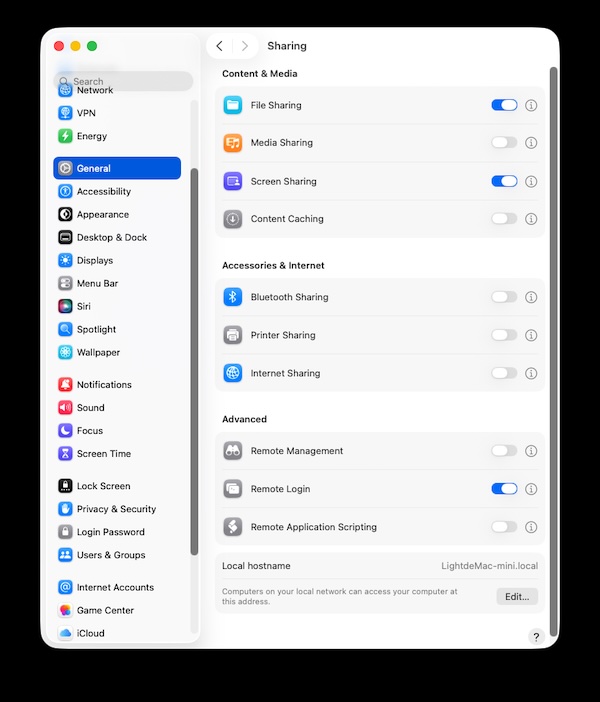
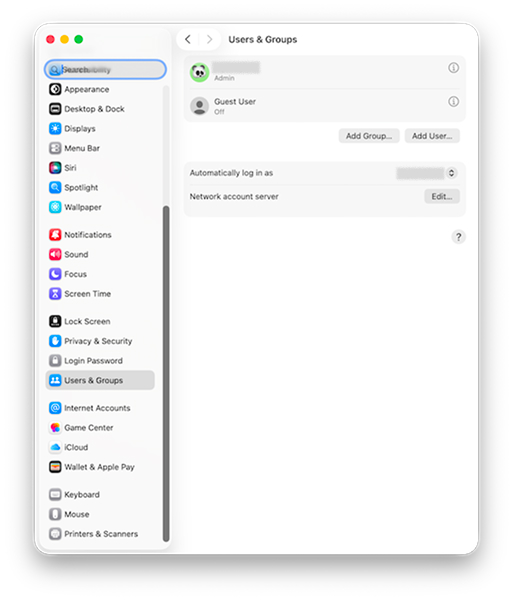
ref: https://support.apple.com/zh-cn/guide/remote-desktop/apdf49e03a4/mac
SSH CLI
勾选 Settings - General - Sharing
- Advanced
- Remote Login , 点后面感叹号,弹窗内勾选 "Allow full disk access for remote users"
see also